


Are you tired of searching for the perfect way to share your favorite recipes online? Wp Ultimate Recipe is here to change how you showcase your cooking skills.
Whether you’re a food blogger, a home chef, or someone who loves collecting recipes, this tool makes your life easier. Imagine having a simple, stylish, and powerful plugin that helps you organize and display your recipes beautifully. Keep reading to discover how Wp Ultimate Recipe can transform your website and attract more visitors, all while making your recipes shine.

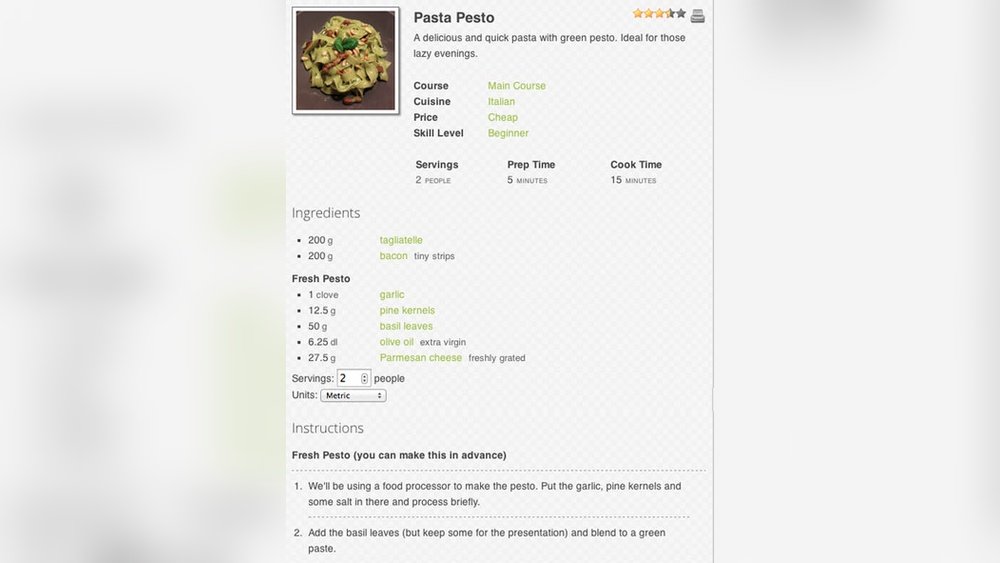
Credit: wpsheeteditor.com
Wp Ultimate Recipe Plugin Basics
The WP Ultimate Recipe plugin is a popular tool for bloggers who share cooking recipes. It helps create, organize, and display recipes easily on WordPress sites. This plugin makes recipes look clean and professional, improving the reader’s experience.
Understanding the basics of WP Ultimate Recipe helps users get started quickly. From installation to exploring its main features, this guide covers key points for beginners. It also highlights the user interface to help you navigate the plugin smoothly.
Installation And Setup
Start by downloading the WP Ultimate Recipe plugin from the WordPress repository. Upload and activate it through your WordPress dashboard. Once active, access the settings to customize the plugin to fit your site’s style. The setup process is simple and requires no coding skills. You can begin adding recipes right away after basic configuration.
Key Features Overview
WP Ultimate Recipe offers several useful features. It supports multiple recipes per post with clear formatting. You can add ingredients, instructions, and cooking times easily. The plugin includes nutrition facts and printable recipe options. It also helps with SEO by adding structured data for search engines. These features make your recipes more attractive and easier to find online.
User Interface Highlights
The plugin’s interface is clean and user-friendly. Adding a recipe involves filling out clear forms for each section. Drag-and-drop options allow easy reordering of ingredients and steps. The visual editor shows how recipes will appear on your site. Simple buttons and tabs make navigation quick. The design focuses on ease of use for beginners and experts alike.
Creating Recipes Effortlessly
Creating recipes with WP Ultimate Recipe is simple and fast. This tool helps you organize your cooking steps clearly. It makes sharing recipes easier and more fun. You can focus on your ideas, not the technical stuff.
Adding Ingredients And Instructions
Start by listing all ingredients needed for your recipe. WP Ultimate Recipe allows you to add each item with quantities. Next, write clear and easy steps for cooking. The plugin keeps everything neat and ordered. Your readers can follow along without confusion.
Using Templates And Layouts
Choose from several templates to style your recipe pages. Templates show ingredients and instructions in a clean format. You can pick layouts that suit your blog’s look. This saves time and keeps your site consistent. No design skills needed to create beautiful pages.
Incorporating Photos And Videos
Add photos to show your dish at different stages. Pictures help readers understand the process better. You can also upload videos to demonstrate tricky steps. Videos make your recipes more engaging and clear. WP Ultimate Recipe supports easy media integration.
Enhancing Seo For Recipes
Enhancing SEO for recipes helps your content reach more food lovers. It makes your recipes easier to find on search engines. Better SEO means more visitors and higher engagement.
Optimizing Recipe Titles And Descriptions
Use clear and simple titles with keywords people search for. Keep titles short and focused on the main dish. Write descriptions that explain the recipe briefly. Highlight key ingredients or flavors. This helps search engines show your recipe to the right audience.
Structured Data And Rich Snippets
Structured data tells search engines about your recipe details. It includes cooking time, ingredients, and ratings. Using structured data can create rich snippets in search results. Rich snippets show extra info like stars and prep time. This makes your recipe stand out and attracts clicks.
Improving Load Speed
Fast-loading pages improve user experience and search rankings. Compress images without losing quality for quicker loads. Use a reliable hosting service to reduce delays. Avoid too many plugins that slow down your site. A fast recipe page keeps visitors happy and engaged.
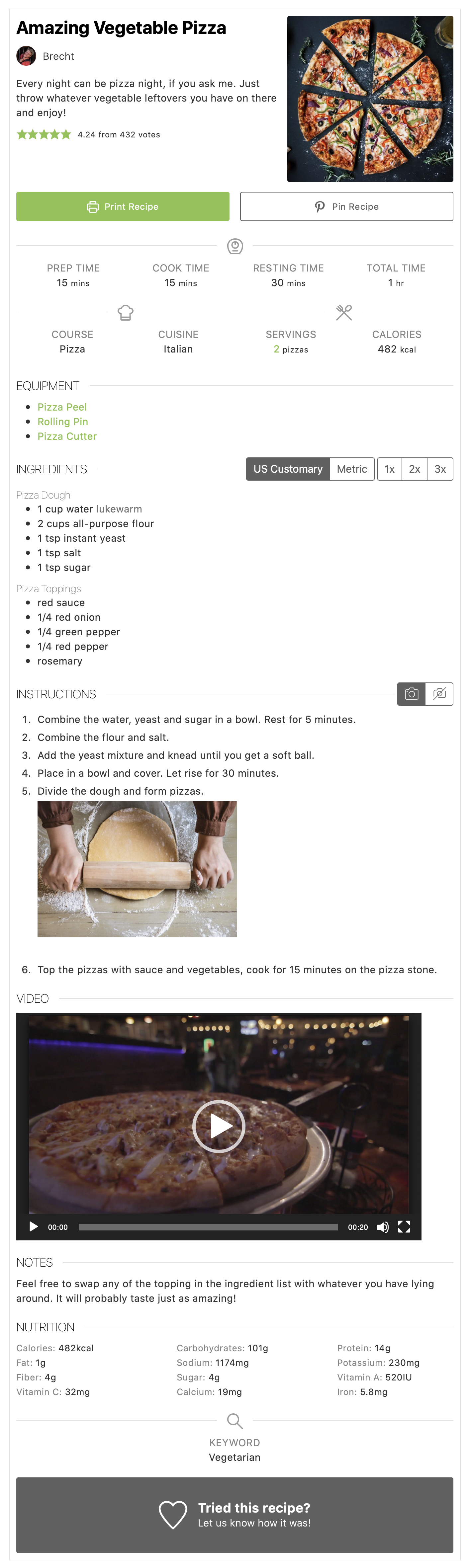
Credit: wordpress.org
Engaging Your Audience
Engaging your audience is key to building a strong community around your recipes. It keeps visitors coming back and encourages them to share their thoughts. WP Ultimate Recipe offers great features to help you connect with your readers. These tools make your recipe site lively and interactive.
Allowing User Ratings And Reviews
User ratings and reviews let visitors share their opinions about your recipes. This feedback builds trust and helps others decide which recipes to try. WP Ultimate Recipe makes it easy for users to rate recipes with stars. Reviews also allow them to write tips or changes they made. This creates a useful resource for everyone.
Social Sharing Options
Social sharing buttons let visitors share recipes on their favorite platforms. This spreads your content to a wider audience quickly. WP Ultimate Recipe supports popular social networks like Facebook, Twitter, and Pinterest. Easy sharing means more people see your recipes. It also helps grow your site’s popularity naturally.
Commenting And Interaction
Comments allow readers to ask questions and share ideas. This interaction builds a sense of community. WP Ultimate Recipe integrates with WordPress comments smoothly. You can reply to comments and keep conversations going. Active discussions make your site more engaging and valuable for visitors.
Customization And Styling
Wp Ultimate Recipe offers many ways to change the look of your recipes. You can make your recipe section match your website’s style. Customization and styling help keep your site neat and nice. It also makes your recipes easier to read and follow.
Adjusting Colors And Fonts
Changing colors helps your recipes fit your website’s theme. You can pick colors for titles, ingredients, and instructions. Fonts also matter. Choose clear fonts that readers can see easily. This makes your recipes more inviting and fun to read.
Custom Css Integration
Custom CSS lets you add your own style rules. It gives more control over how recipes look. You can change margins, borders, and backgrounds. This is useful for unique designs or special effects. You do not need to touch the main plugin files.
Responsive Design Tips
Recipes must look good on all devices. Check your site on phones, tablets, and computers. Use flexible layouts that adjust to screen size. Avoid large images that slow down your page. Clear text and simple design work best for all users.

Credit: www.hostgator.com
Advanced Features For Pros
Wp Ultimate Recipe offers advanced features designed for professional food bloggers and chefs. These tools help manage recipes more efficiently and provide better user experience. The features focus on nutrition, printing, and easy sharing.
Recipe Nutrition Facts
Wp Ultimate Recipe calculates nutrition facts automatically. It shows calories, fat, protein, and carbs for each recipe. This helps readers understand the health value of meals. The feature supports popular nutrition labels. You can customize the data to fit your needs.
Printable Recipe Cards
Users can print recipes with clean, easy-to-read cards. The cards include all ingredients and instructions clearly. They make it simple for readers to follow recipes offline. The print layout is professional and visually appealing. This feature saves time for both bloggers and readers.
Recipe Import And Export
The plugin allows importing recipes from other sources quickly. It supports many file formats for easy migration. Exporting your recipes is just as simple. This keeps your content safe and easy to back up. Sharing recipes between sites is no longer a hassle.
Troubleshooting And Support
Wp Ultimate Recipe is a powerful tool for creating and sharing recipes. Sometimes, users face issues while using it. This section helps solve common problems and shows how to find support. Clear guidance helps keep your recipe site running smoothly.
Common Issues And Fixes
Some users find the plugin slow or unresponsive. Clearing your browser cache often helps. Another issue is recipe images not showing. Check image settings and upload limits.
Recipe formatting may appear broken. This usually happens due to theme conflicts. Switching to a default theme can test this. Also, ensure the plugin is up to date. Updates fix many bugs and improve performance.
Accessing Documentation
Wp Ultimate Recipe offers detailed documentation. It covers installation, setup, and customization. The guides use simple steps and pictures. Search the docs for specific problems. Reading the documentation saves time and avoids confusion.
Community And Developer Resources
Many users share tips in forums and social groups. Join these to ask questions and learn tricks. Developers also provide support through official channels. They release updates and fix bugs regularly. Participating in the community helps solve problems faster.
Frequently Asked Questions
What Is Wp Ultimate Recipe Plugin?
WP Ultimate Recipe is a WordPress plugin designed for creating, managing, and displaying recipes on websites. It offers user-friendly features like recipe formatting, ingredient lists, and step-by-step instructions. This plugin helps food bloggers and chefs enhance their content with SEO-optimized recipes.
How Do I Add Recipes Using Wp Ultimate Recipe?
To add recipes, install and activate the plugin, then use the recipe editor. Enter ingredients, instructions, and notes. You can also add images and categorize recipes. The plugin automatically formats recipes for better readability and SEO.
Is Wp Ultimate Recipe Mobile-friendly?
Yes, WP Ultimate Recipe is fully responsive and mobile-friendly. Recipes adjust to various screen sizes for easy reading on smartphones and tablets. This enhances user experience and supports SEO by improving site accessibility.
Can Wp Ultimate Recipe Improve Seo For Food Blogs?
Absolutely. WP Ultimate Recipe uses schema markup that helps search engines understand recipe content. This can boost visibility in search results and attract more organic traffic to your food blog or website.
Conclusion
Wp Ultimate Recipe helps you share recipes with ease. It offers simple tools for creating and organizing recipes. Readers can find and follow your recipes quickly. The plugin fits well with many WordPress themes. You can add photos, ingredients, and instructions clearly.
This makes your site more attractive and useful. Try Wp Ultimate Recipe to make your cooking blog better. Your visitors will enjoy the easy-to-use features and clear layout. Start sharing your favorite recipes today and grow your audience.
